

I start every content plan with one owner, one final approver, and one shared record for each deliverable. Before work begins, I confirm the goal, required inputs, and deadlines – including the time zone.
From there, I keep the process focused on four things:
- Plan before production: Connect business goals to the calendar, check team capacity, and confirm that briefs are ready.
- Make approvals clear: Set review deadlines, combine feedback, and escalate missed responses. Silence is not approval.
- Settle conflicts in writing: Record decisions, next steps, and any changes that need another review.
- Turn results into action: Track delivery and business results separately, then assign follow-up tasks and update the plan.
The payoff can be measurable: the article cites Madhappy saving 25 review hours a month and speeding approvals by 40% after moving planning and review into Opal.
My rule: <u>every handoff ends with a named owner and an agreed next step</u>.
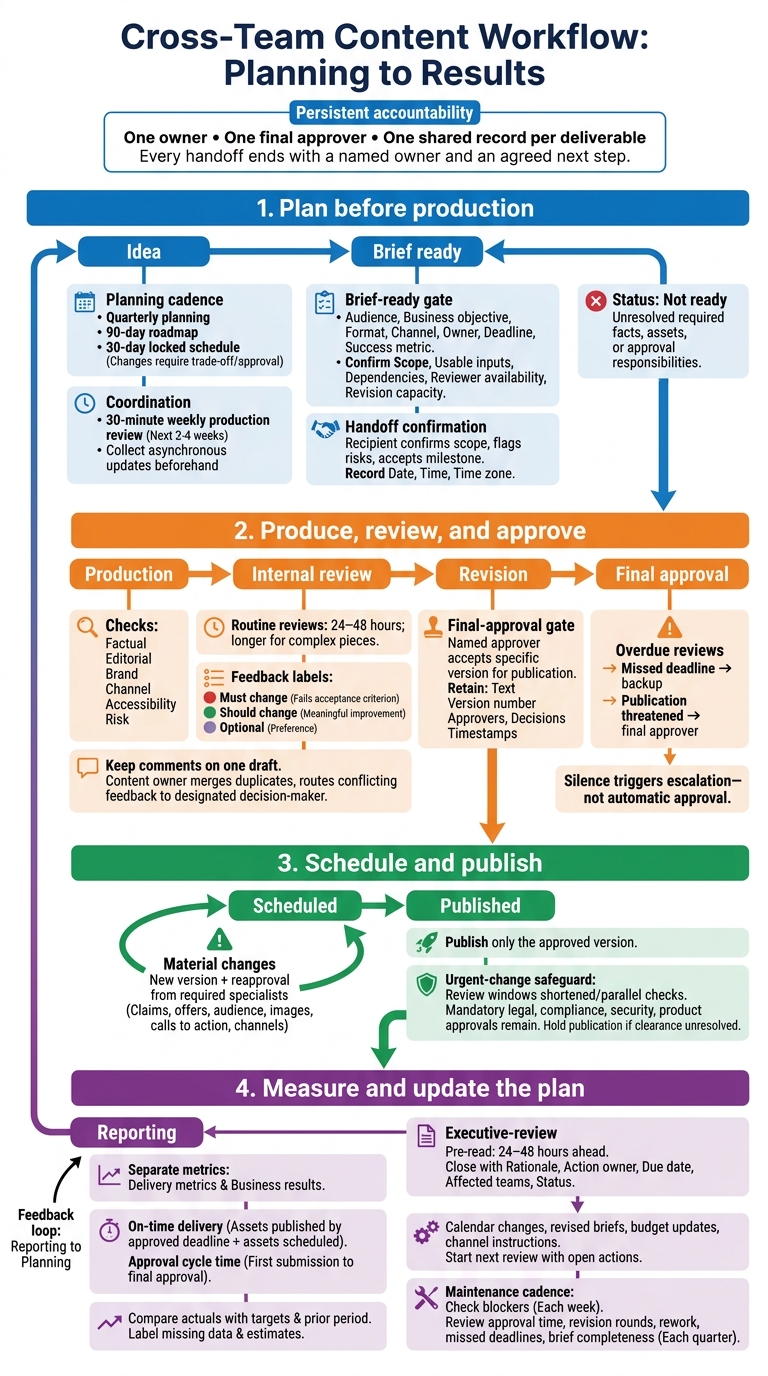
Cross-Team Content Workflow: Planning to Results
Planning and Briefs: Agree Before Production
Plan the Calendar Around Business Priorities
Use quarterly planning to set business goals, priority audiences, campaigns, and launches. Map those priorities to monthly themes and individual deliverables. Each calendar entry should include an objective, audience, core message, format, channel, contributors, dependencies, reviewers, status, and dates from draft to publication. Link the brief and working files.
Maintain a 90-day roadmap with a 30-day locked schedule. Any change within that locked window needs an explicit trade-off or approval.
Work backward from publication through scheduling, quality review, approval, revisions, design, drafting, and research. Before committing to dates, confirm capacity with writers, designers, specialists, and reviewers.
Use a RACI matrix for each deliverable and decision. Responsible does the work; Accountable owns the outcome; Consulted provides required expertise; Informed receives updates. Assign every responsibility, even when one person fills several roles.
Use the calendar as the working plan for creating briefs and handing off work.
Choose Communication Channels and Schedules
With the calendar set, choose the right channel for each decision. Hold a 30-minute weekly production review to cover the next two to four weeks, blockers, capacity, and decisions. Gather async updates beforehand: completed work, next steps, blockers, help needed, and whether dates are still achievable.
Write every deadline with its date, time, and time zone. Recheck recurring schedules around daylight saving time, especially when teams span time zones.
Save live meetings for decisions. Use async updates for routine progress.
| Channel | Use | Timing |
|---|---|---|
| Live review | Urgent trade-offs | When participants are available |
| Asynchronous update | Routine progress | Within the agreed response window |
| Shared-calendar or project comment | Item-specific decisions | By the item’s response deadline |
Complete the Brief and Confirm the Handoff
Once work is scheduled, move only ready briefs into production. Use a standard brief that covers the audience, objective, core promise, angle, key message, evidence and source links, format, channel, brand guidance, assets, claims or disclaimers, CTA, reviewers, and deadlines.
Keep writing and design direction separate from acceptance criteria. Direction guides the approach. Criteria define what must pass review, including factual support, accessibility, required assets, and approved claims.
A brief is ready for production only when scope, inputs, and reviewers are clear. Before assigning the work, check that inputs are usable, dependencies have delivery dates, reviewers are available, and the schedule leaves room for revisions. Mark the brief Status: Not ready if required facts, assets, or approval responsibilities remain unresolved.
Complete the handoff only when the recipient confirms the scope, flags missing inputs or capacity risks, and accepts the next milestone with a date, time, and time zone. Log that confirmation, along with questions and decisions, in the deliverable record. Use this handoff record as the baseline for approvals.
sbb-itb-2fdc177
Improving Cross-Team Coordination | Humanizing Work Show
Approvals and Conflicts: Set Decision Rules
Start the approval trail with the confirmed handoff.
Define Workflow Stages and Approval Roles
Assign an owner, deadline, and clear entry and exit rules to each stage: idea, brief ready, production, internal review, revision, final approval, scheduled, and published.
An idea reaches brief ready only when the audience, business objective, format, channel, owner, deadline, and success metric are documented. A draft leaves internal review only after factual, editorial, brand, channel, accessibility, and risk checks are complete. Final approval means the named approver has accepted that specific version for publication. Record every approver and timestamp.
| Approval model | Strengths | Limitations | Speed | Suitable content |
|---|---|---|---|---|
| Centralized | Consistent standards, clear ownership, and easier quality control | Can create a bottleneck and limit subject-matter input | Medium to slow at high volume | Core brand campaigns, major website pages, executive communications |
| Distributed | Faster decisions near the work, with stronger specialist or regional context | Greater risk of inconsistent voice, duplicate feedback, and unclear accountability | Fast when teams are experienced | Routine social posts, regional content, channel-specific updates |
| Tiered | Matches review effort to risk while balancing speed and governance | Needs accurate risk classification and well-maintained rules | Fast for low-risk work; slower for high-risk work | Most mature content programs, especially those covering blog, product, paid, and regulated content |
Before production starts, name one final approver, the required specialists, and backups. Specialists approve only their area, whether that’s product claims, legal risk, brand, or channel requirements.
Allow 24 to 48 hours for routine reviews and longer for complex pieces. Send reminders and route missed deadlines to the backup. If a delay threatens publication, escalate to the final approver. Silence triggers escalation – not automatic approval.
Triage Feedback and Freeze the Approved Version
Check business fit, accuracy, brand voice, channel requirements, product and legal risk, links, formatting, and accessibility against the acceptance criteria. Label feedback so reviewers and writers know what needs action:
- Must change: The draft fails an acceptance criterion.
- Should change: The suggestion offers a meaningful improvement.
- Optional: The comment reflects a preference.
Keep all comments on one draft. The content owner merges duplicates and sends conflicting feedback to the designated decision-maker.
After revisions, freeze the approved version. Retain its text, version number, approvers, decisions, and timestamps. Material changes to claims, offers, audience, images, calls to action, or channels require a new version and reapproval from the required specialists.
Resolve Disputes and Handle Urgent Changes
Classify the disagreement before reopening revisions. Factual issues need evidence or specialist judgment. Business-priority issues return to the approved objective. Preferences follow audience needs and brand standards. Scheduling conflicts need a decision about capacity and publication priorities.
Contributors first clarify the issue. The content owner then summarizes the options against objectives, evidence, standards, risk, and timing. The decision-maker chooses by a stated deadline. Record the reasoning, affected dependencies, follow-up owners, and revised commitments so the same disagreement doesn’t restart in the next round.
For urgent executive, legal, product, or crisis changes, define who can activate an expedited path. The content owner records the reason and deadline, alerts the final approver, and brings in the minimum required specialists.
Shorten review windows or run independent checks in parallel, but keep mandatory legal, compliance, security, and product approvals. Hold publication if required clearance is unresolved. If the content is already live, assess whether it needs correction or removal. Afterward, review the exception to identify which checks were compressed, what risks remain, and what workflow changes are needed.
Reporting and Executive Review: Turn Results Into Decisions
After publishing, use the approved brief and calendar record to check what shipped and what it achieved.
Track Delivery and Business Results
Connect each metric to the brief’s objective. Keep delivery metrics separate from business results, and define each metric’s formula, source, owner, reporting period, and target. Calculate on-time delivery as assets published by the approved deadline ÷ assets scheduled. Measure approval cycle time from first submission to final approval.
Compare actual results with both the target and the prior period. Show absolute and percentage changes. Before the review, reconcile calendar and CMS records with analytics, CRM, and finance data, and label estimates and missing data. Attribution assigns credit; it doesn’t prove causation. Report tracked conversions separately from pipeline influenced by content, and note paid promotion, seasonality, and sales follow-up.
Match Reports to Their Audience
Give each audience the detail it needs to make decisions. Keep routine blockers in team reports. Escalate them only when they threaten a deadline, budget, compliance rule, or business objective. Lead with what changed, why it matters, and the decision needed.
| Report | Audience | Frequency | Metrics and detail | Decision purpose |
|---|---|---|---|---|
| Production report | Writers, designers, editors, channel owners | Weekly or twice weekly | Asset status, due dates, blockers, approval cycle time, revision volume; task-level detail | Remove delivery obstacles and protect publishing dates |
| Campaign report | Marketing, sales, product, and regional leads | Weekly during launch; monthly afterward | Reach, high-intent traffic, engagement, CTA clicks, conversions, qualified leads, cost, pipeline contribution, target variance; campaign and channel detail | Optimize channels, messaging, budget, and campaign priorities |
| Executive report | Senior leaders and budget owners | Monthly or quarterly, with exception-based updates | Spend versus plan, progress toward business goals, material risks, resource needs; summary with supporting appendix | Confirm alignment with business goals, allocate resources, and change priorities |
End Executive Reviews With Assigned Actions
End executive reviews with assigned actions, not just discussion notes. Hold a recurring leadership review to assess alignment, spend, capacity, priorities, and bottlenecks. Send a short pre-read 24–48 hours ahead covering targets, actuals, variances, risks, and decisions needed. Put asset-level data and methodology in an appendix, and agree on escalation thresholds beforehand.
For example, revise or redistribute an asset when high-intent traffic is at least 20% below target for two reporting periods.
Record each decision’s rationale, action owner, due date, affected teams, and status. Start the next review with open actions. Escalate overdue items rather than reopening settled decisions without new evidence. Turn decisions into calendar changes, revised briefs, budget updates, or channel instructions. Then notify affected contributors and record when they were notified.
Conclusion: Put the Communication Process Into Practice
Once reporting closes the loop, set up the workflow for the next cycle. Keep priorities, ownership, and decisions visible. Clear briefs, approval authority, rules for resolving conflicts, and reporting help content move forward.
Use a Setup Checklist
Treat this checklist as the minimum standard for how work gets done.
Before launch, confirm:
- Planning and briefs: Shared calendar location, content marketing best practices, publishing dates, owners, reviewers, approvers, and dependencies. Set brief requirements for the audience, business goal, key message, format, channel, sources, CTA, deadline, and success metric.
- Workflow and records: Status labels, naming conventions, file locations, response windows, approval rules, escalation paths, reporting fields, and review dates. Store every brief, decision, and results note in one content record.
- Accountability and decisions: Require one accountable owner and one final approver. Resolve disputes based on business priority, audience value, evidence, risk, deadlines, and capacity.
Check Bottlenecks and Update Standards
Use the checklist as your baseline, then adjust it where work gets stuck. Each week, check stalled items for incomplete briefs, unclear ownership, overdue reviews, missing sources, unresolved dependencies, or shifting priorities. Give each blocker an owner and a deadline.
Each quarter, review approval time, revision rounds, rework, missed deadlines, and brief completeness by team and channel. Update the standards when teams, channels, regulations, tools, or priorities change.
Hypothetical Example: Plan Leadership Community Content
A simple cadence can look like this:
For CEO Hangout, a weekly cadence could include one leadership article, one member story, and one event update, each with a named owner, source requirements, approver, deadline, publication date, CTA, and success metric. Track qualified inquiries, engaged sessions, and registrations, then use a 30-day results note to guide the next calendar update.
FAQs
How can a small team simplify this workflow?
Consolidate work and automate where possible. Interview an executive once, then turn their perspective into articles, social posts, and video clips. This cuts down on review cycles.
Create a one-page charter that spells out communication channels and expected response times. Keep tasks in a central project management tool, with one owner per task, progress tracking, and clear deadlines. Close every meeting with a written summary of who’s responsible for what to prevent confusion and friction.
How do we get teams to follow shared deadlines?
Use one shared content calendar with real-time updates, clear roles, task owners, and publishing dates. Define the workflow so everyone knows what happens next.
End each meeting with written decisions, deadlines, and next steps. Immediately post a summary in the project channel that names each decision, its owner, and its deadline.
Track action items in Trello or Asana, and set approval timelines through service-level agreements (SLAs). For example:
Allow 48 hours for executive approval and 72 hours for legal approval.
How can we reduce reviews without increasing risk?
Keep feedback in one content management platform so teams don’t work from conflicting document versions. Set departmental service level agreements (SLAs) – such as 72 hours for legal and 48 hours for executives – to keep reviews moving.
Use one interview to gather an executive’s viewpoint, then turn it into multiple content formats. Bring legal and compliance teams into scripting instead of waiting until the end. This helps prevent last-minute blockers and keeps the content accurate.