

I treat a programmatic data taxonomy as a rulebook for data use – not just campaign names. Start with one activation path and one reporting path. Assign owners, define terms, and require privacy approval before launch.
In this guide, I explain how to:
- Set goals and scope while keeping audience, content, ad product, and privacy data separate.
- Create stable IDs, required dictionary fields, and rules for naming, versions, and retirement.
- Assign change approval rights and resolve disputes.
- Check permissions, map industry standards, and test vendor terms.
- Define conversions, reporting rules, quality checks, and review schedules.
My starting targets: 100% owner coverage for critical fields, at least 95% approved mapping coverage, and a 90-day maximum mapping age. These are proposed controls, not industry benchmarks.
The rule I put first: <u>a classification label is not permission to use data</u>. Your team needs approved uses, destinations, and clear reporting rules before activation.
How to Build and Implement an Enterprise-Grade Marketing Taxonomy
sbb-itb-2fdc177
Design the Taxonomy and Naming Rules
Once the scope is fixed, lock down the structure and naming rules so terms stay consistent across activation and reporting.
Set Hierarchies and Stable IDs
Use a four-level hierarchy built around reporting and governance – not platform convenience. Business domain identifies the responsible business area. Data type describes the broad nature of the information. Signal family groups related signals. Segment defines the classification used for analysis or audience construction. Add another level only when it serves a separate reporting or governance need, not to match a platform field.
Hypothetical schema – not a production taxonomy:
business_domain > data_type > signal_family > segment
Persistent segment ID:seg_00427
Give every node a persistent, machine-readable ID that is never reused. Keep seg_00427 unchanged when its display name changes. Store destination labels and destination IDs in separate mapping fields. If the meaning changes materially, assign a new ID.
Use this hierarchy to decide what belongs in each record, then standardize the required fields.
Define Required Data Dictionary Fields
Make the dictionary a required part of publishing, not optional documentation. Every term needs a plain-language definition and the fields below. Reject incomplete records before activation.
| Field | Definition | Allowed values | Validation rule | Owner |
|---|---|---|---|---|
| Owner | Person or team accountable for the term | Registered owner or team ID | Must identify an accountable owner | Taxonomy steward |
| Permission basis | Approved basis and restrictions for use | Organization-approved privacy categories | Cannot be blank for activation-enabled data | Privacy or legal owner |
| Approval status | Governance state | proposed, approved, active, deprecated, retired |
Status transitions require recorded approval | Taxonomy council |
| ID | Persistent identifier for the term | Pattern such as seg_##### |
Must be unique, immutable, and never reused | Taxonomy steward |
| Name | Canonical human-readable label | Approved controlled vocabulary | Lowercase snake_case; no duplicate meanings |
Domain owner |
| Inclusion criteria | Conditions that qualify data for the term | Structured rule or documented logic | Must be testable and specific | Domain owner |
| Exclusion criteria | Conditions that disqualify data | Structured rule or documented logic | Must address overlapping segments | Domain owner |
| Provenance | Source and lineage of the data | Approved source systems or vendors | Source must be documented and reviewable | Data steward |
| Collection method | How the data was obtained | declared, observed, transactional, inferred, imported |
Must match source documentation | Data engineering |
| Geography | Geographic scope | ISO-style country or region codes, such as US |
Use approved codes; do not mix country names and codes | Regional owner |
| Expiration rule | When membership or validity ends | Duration, event, or explicit date | Must define stale-data handling | Domain owner |
| Destinations | Approved activation systems | Registered destination IDs | Destination must be approved for the permission basis | Activation owner |
| Measurement use | Permitted analytical purposes | reporting, attribution, optimization, suppression, or combinations |
Must align with approved purpose | Measurement owner |
Once the dictionary is complete, apply the naming, versioning, and retirement rules.
Set Naming, Versioning, and Retirement Rules
Stable names and clear lifecycle rules help prevent reporting drift, activation errors, and confusion about ownership.
Use an approved controlled vocabulary with lowercase snake_case, plain US English, and singular nouns for entities. Avoid unexplained abbreviations and vendor terminology. Standardize geography codes, language tags, and lookback windows. Use controlled lifecycle values such as prospect, customer, and former_customer, and reserve suppression labels for exclusion or control purposes.
Define null handling explicitly: unknown, inapplicable, and uncollected are different states. Keep destination labels in a mapping layer instead of changing canonical terms to fit platform character limits.
Version releases separately from IDs. Use major versions for breaking changes, minor versions for compatible additions, and patch versions for corrections that preserve meaning. Record the approver, effective date, mapping changes, QA results, and impact on historical reporting.
A rename that preserves meaning keeps the same ID. A material change to meaning or inclusion logic requires a new ID. Preserve the old term so historical data can still be interpreted.
Deprecation blocks new use. Retirement blocks new activation and reporting. Never reuse retired IDs. Keep historical definitions and mappings, and document any replacement and final-use date.
Assign Owners and Change Approval Rights
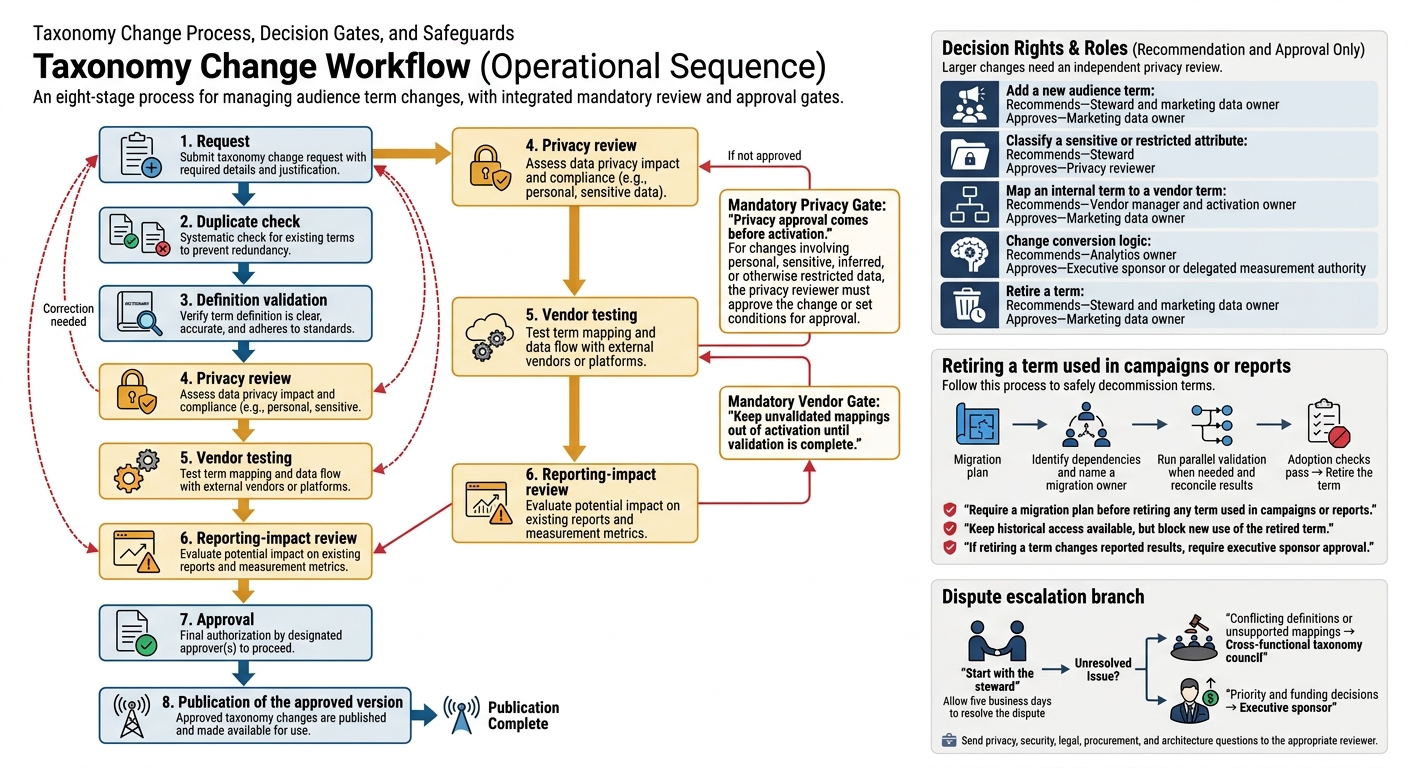
Programmatic Data Taxonomy Approval Workflow
Define Leadership and Team Responsibilities
Once the taxonomy structure is set, assign decision rights to keep changes controlled. Name one marketing data owner, one steward, and approvers for privacy, measurement, and activation. Larger changes need an independent privacy review.
| Decision | Recommends | Approves | Implements | Audits | Consulted |
|---|---|---|---|---|---|
| Add a new audience term | Steward and marketing data owner | Marketing data owner | Technology owner and activation owner | Analytics owner | Vendor manager |
| Classify a sensitive or restricted attribute | Steward | Privacy reviewer | Technology owner | Independent privacy or audit reviewer | Marketing data owner and analytics owner |
| Map an internal term to a vendor term | Vendor manager and activation owner | Marketing data owner | Activation owner and technology owner | Analytics owner | Vendor manager |
| Change conversion logic | Analytics owner | Executive sponsor or delegated measurement authority | Technology owner | Analytics owner or an independent reviewer | Marketing data owner |
| Retire a term | Steward and marketing data owner | Marketing data owner | Technology and activation owners | Analytics owner | Privacy reviewer and vendor manager |
Privacy approval comes before activation. For changes involving personal, sensitive, inferred, or otherwise restricted data, the privacy reviewer must approve the change or set conditions for approval. If retiring a term changes reported results, require executive sponsor approval.
Apply these decision rights to every taxonomy change so each follows the same approval path.
Approve, Publish, and Retire Taxonomy Terms
Record each step in the workflow: request, duplicate check, definition validation, privacy review, vendor testing, reporting-impact review, approval, and publication of the approved version.
Require a migration plan before retiring any term used in campaigns or reports. Identify dependencies, name a migration owner, run parallel validation when needed, and reconcile results. Retire the term only after adoption checks pass. Keep historical access available, but block new use of the retired term.
Resolve Definition and Funding Disputes
When owners disagree, start with the steward and allow five business days to resolve the dispute. Escalate only unresolved issues: conflicting definitions or unsupported mappings go to the cross-functional taxonomy council; unresolved priority and funding decisions go to the executive sponsor.
Keep unvalidated mappings out of activation until validation is complete. Send privacy, security, legal, procurement, and architecture questions to the appropriate reviewer.
Funding requests should separate one-time migration costs from recurring operating costs and state the expected business outcome they support.
Review Privacy and Map Vendor Terms
Record Data Sources, Permissions, and Use Restrictions
Before activation, attach a privacy and usage record to every audience, content, and ad-product term. Include its ID, definition, source, collection method, provider status, permission basis, permitted and prohibited uses, geography, retention, deletion trigger, suppression process, and downstream deletion rules.
Treat identifiers, IP addresses, URLs, geolocation, browsing events, purchase records, inferred interests, and contextual labels as possible personal-data or sensitive-inference signals.
Keep legal requirements separate from company policy and safeguards. Qualified privacy or legal reviewers should determine which requirements and vendor-use limits apply. Document which fields enter bid requests or activation files and which vendors receive them. Specify whether those vendors may retain, enrich, resell, or repurpose the data. Check that state-level exclusions, suppression controls, and vendor deletion obligations are enforced.
Map Internal Terms to Relevant Standards
Once privacy limits are clear, map only terms approved for external use. Use IAB Tech Lab’s Audience Taxonomy for audience attributes, Content Taxonomy for content subject matter, and Ad Product Taxonomy for the advertised product or service. When vendor labels leave gaps or conflict, use the internal definition to resolve them.
For each mapping, record the standard name, version, category ID, match type, rationale, reviewer, effective date, review date, and restrictions. Mark the match as exact, partial, inferred, or unavailable. If no external equivalent exists, keep the internal term and mark its mapping unavailable. Verify the current live version before implementation.
Validate Vendor Mappings Before Activation
Before activating a mapped term, check the vendor label against the internal definition. Keep a comparison log that covers collection and modeling methods, eligibility thresholds, geography, refresh frequency, expiration behavior, minimum audience size, costs, delivery method, and reporting differences.
Compare inclusion criteria, exclusions, examples, age or eligibility rules, recency windows, modeled-versus-observed status, and reporting behavior. Test privacy, technical, operational, and reporting behavior before the designated owners approve activation. Missing evidence blocks activation.
Suspend affected mappings and require revalidation when permissions, vendor definitions, contracts, or source populations materially change. Use these controls to set reporting rules and review intervals.
Set Reporting Rules and Review Schedules
With privacy, vendor mapping, and activation rules in place, fix the measurement logic your reports will use.
Define Conversion and Reporting Rules
Leaders must agree on what counts, where it comes from, and who can change it. Put these rules in the taxonomy – not in a separate analytics document.
Create a measurement contract for each critical event. Include its definition, source, owner, update cadence, attribution window, time zone, and acceptable variance. Classify events as macro conversions (business outcomes) or micro conversions (supporting actions). Label optimization, reporting, and governance fields separately. Specify whether dashboards use interaction date or conversion date, and whether a conversion counts once or with every occurrence.
Use this tracking matrix to match campaign settings with dashboard outputs.
Attribution windows are draft reporting rules, not platform defaults; confirm support before launch.
Objective Funnel stage Segment Campaign Ad asset Placement Conversion event KPI Attribution window Lift measure Permission status Dashboard output Increase new-customer revenue Conversion New customers US search – nonbrand Product ad Google Search Completed purchase Revenue, ROAS, new-customer rate 30-day click, 1-day view Holdout or geo lift, if available Approved for measurement and activation Executive revenue dashboard Generate sales pipeline Consideration/conversion Target accounts Q4 enterprise demand Case-study video LinkedIn feed Accepted qualified lead Qualified leads, cost per qualified lead, pipeline value 30-day click, 7-day view Account or regional lift, if available Consent and contractual use confirmed Pipeline dashboard Improve product engagement Awareness/consideration Product-qualified users Feature education Demo video YouTube Product-page view or demo start Engaged visits, completion rate 7-day click, 1-day view Brand or traffic lift, if available Measurement-only or approved activation Campaign operations dashboard
Identify which fields are required for launch, which are for analysis only, and which cannot be used for activation. Record currency in U.S. dollars where applicable, use U.S. date formatting, and document the reporting time zone.
Deduplicate before aggregation. Use order IDs for purchases, CRM IDs for leads and opportunities, and event IDs plus timestamps for behavioral events. Keep campaign, ad group, asset, placement, date, and conversion-event detail intact until aggregation. If platform totals differ, check attribution windows, lookback periods, time zones, identity rules, late-arriving events, and conversion-counting logic.
Keep unknown, not_provided, not_applicable, and mapping_pending separate. Give each exception a reason code. Show unresolved values in the data-quality view when they affect executive rollups.
Do not remap deprecated values without approval. Preserve the source value and version in audit logs. Publish any restated report with a clear crosswalk and a new metric version.
With the measurement contract fixed, set a review schedule to keep it stable.
Set Review Schedules and Control Thresholds
Regular reviews keep taxonomy definitions from drifting. Set intervals based on risk, with one owner for each control. Review operations monthly and policy changes quarterly.
Track ownership coverage, approved mapping coverage, provenance completeness, duplicate rates, reporting exceptions, dashboard update recency, approval time, deprecated-term usage, privacy-review completion, mapping age, and unexplained source-system variance. Give each metric a target, trend, owner, and escalation rule.
Starting targets are 100% ownership coverage for critical fields, at least 95% approved mapping coverage, zero unresolved privacy violations, an agreed duplicate-rate limit, and a maximum mapping age of 90 days. Keep unapproved mappings blocked from activation.
| Interval | Accountable owner | Evidence | Decision threshold | Escalation path |
|---|---|---|---|---|
| Before every launch | Campaign owner | Naming check, event test, consent check, mapping approval | Required-field failure, broken event, or unapproved use blocks launch | Marketing operations; privacy counsel for permission issues |
| Monthly | Taxonomy steward | Quality report, mapping exceptions, duplicate rate, stale terms, dashboard variance | Threshold exceeded for two cycles or any material metric distortion | Head of growth and data governance lead |
| Quarterly | Marketing data owner | Definition review, requirements log, exception trends, cost and impact assessment | Changed metric definition, ownership, or regulatory requirement | Marketing and privacy leadership |
| Annually | Executive sponsor | Architecture review, vendor inventory, maintenance budget, risk assessment | Architecture no longer fits strategy, scale, or privacy needs | Executive steering committee |
| Immediately after an incident | Incident owner | Incident record, affected systems, remediation evidence | Broken mapping, unapproved activation, material misreporting, or privacy-control failure | Executive sponsor, security/privacy, affected owners |
Conclusion: Approve the Taxonomy Operating Model
Approve the operating model, including taxonomy, measurement, ownership, privacy, vendor mapping, and review cadence.
Leadership approval checklist
- Approve scope, canonical definitions, and stable IDs.
- Assign owners and approval, publication, retirement, and dispute-resolution rights.
- Sign off on privacy gates, vendor mappings, and reporting rules.
- Set quality thresholds and escalation authority.
- Fund stewardship and maintenance.
- Publish the effective date, review cadence, and first governance review.
FAQs
How do we choose our first taxonomy pilot?
Start with a specific business question that affects results – and that the company currently struggles to answer. Pick one report that helps the person making the decision act faster, choose better, or support their choice with stronger evidence.
Keep the scope small rather than planning a full rollout. Limit the data sources and entities so you can show value within one quarter. Measure success against a documented baseline that records current performance, effort, and data gaps.
How can we measure taxonomy ROI?
Start by recording hours spent on manual reporting and cases where data versions conflict. Measure ROI by tracking shorter reporting cycles and automated reports with reconciled data that guide leadership decisions. Assign every metric an owner and a clear threshold that triggers action.
During each reporting cycle, check that numbers trace back to their sources and definitions stay consistent. Confirm that teams can answer board questions promptly and that internal staff can maintain reporting without external consultants.
How can a small team manage taxonomy governance?
Start with clear structure, named owners, and regular reviews. Create a shared KPI Dictionary that records each metric’s business definition, formula, data sources, and owner so everyone knows who’s accountable. Use a centralized system of record to prevent data discrepancies, and automate data pipelines to reduce manual errors.
Set up a monthly metrics council to settle disputes over definitions, handle exceptions, and keep the team aligned with business goals.